




If you’re considering a Tesla or already own one, you’ve probably heard about Sentry Mode. But what exactly is it? How does it work? And is it really effective against theft and vandalism?
In this detailed guide from cars24by7.com, we break down everything you need to know about Tesla Sentry Mode — features, battery usage, setup process, and whether it’s worth keeping on.
What Is Tesla Sentry Mode?
Sentry Mode is Tesla’s built-in vehicle security system that uses the car’s external cameras and sensors to monitor its surroundings while parked.
Available on models like the:
- Tesla Model S
- Tesla Model 3
- Tesla Model X
- Tesla Model Y
Sentry Mode acts like a 360-degree surveillance system, recording suspicious activity and alerting the owner in real time.
How Does Sentry Mode Work?
When activated, Sentry Mode uses the vehicle’s cameras and onboard computer to detect potential threats.
It operates in three stages:
1️⃣ Standby Mode
The vehicle monitors its surroundings quietly while parked.
2️⃣ Alert Mode
If someone leans on the car or looks inside:
- The touchscreen displays a warning message
- Cameras prepare to record
- The system escalates monitoring
3️⃣ Alarm Mode
If a serious threat is detected:
- The alarm activates
- Headlights flash
- Loud music may play
- A notification is sent to your phone
- Video footage is saved
This multi-level response helps deter vandalism before damage happens.
What Does Sentry Mode Record?
Sentry Mode records video clips from multiple exterior cameras when suspicious activity is detected.
Footage includes:
- Side cameras
- Front camera
- Rear camera
- Surrounding angles
The clips are stored on a USB drive inserted into the vehicle. Tesla recommends using a high-speed, high-endurance USB for reliability.
Owners can review clips:
- On the car’s touchscreen
- On a computer
- Via the Tesla mobile app (with Premium Connectivity)
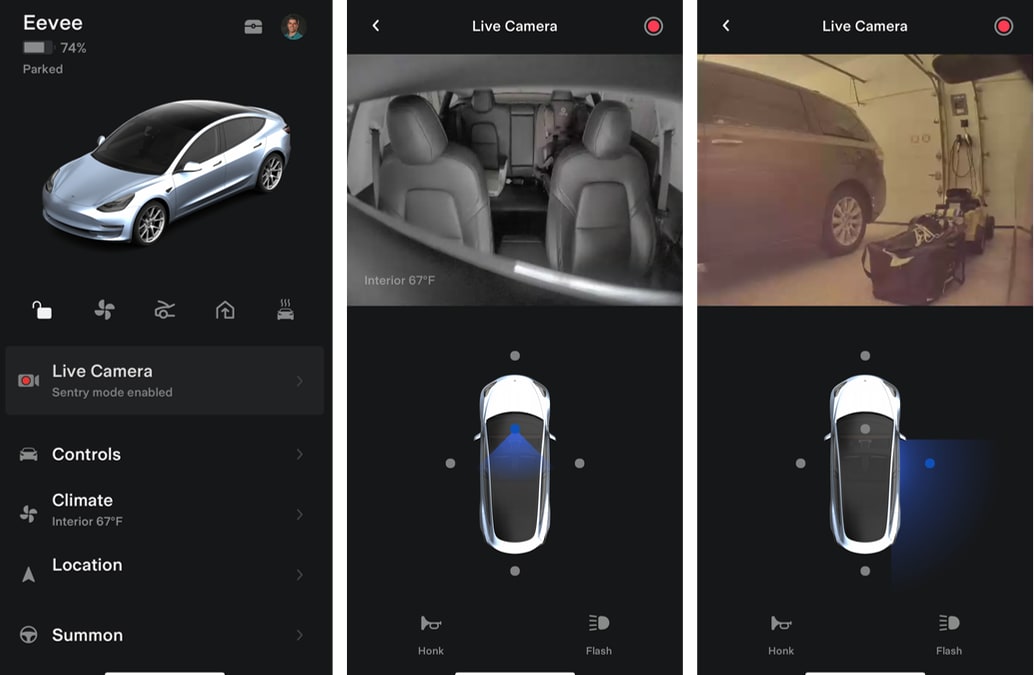
Live Camera View (Remote Monitoring)
With Premium Connectivity, Tesla owners can:
✔ View live camera feeds remotely
✔ Receive real-time alerts
✔ Speak through the vehicle’s external speaker (on supported models)
This adds an extra layer of security when you’re away from your car.
Does Sentry Mode Drain Battery?
Yes — because it keeps cameras and systems active.
On average:
- It may consume 1–2% battery per hour
- Usage varies depending on temperature and activity
Many owners disable Sentry Mode at home to conserve battery.
How to Enable Sentry Mode
You can activate Sentry Mode:
- From the vehicle’s touchscreen
- Through the Tesla mobile app
- Automatically when parked
You can also exclude certain locations like:
- Home
- Work
- Favorite places
This prevents unnecessary battery usage in safe environments.
Is Tesla Sentry Mode Worth It?
Pros:
✔ Strong theft deterrent
✔ Provides video evidence
✔ Remote access capability
✔ Built-in — no need for third-party cameras
Cons:
✖ Battery drain
✖ Requires USB storage
✖ May not prevent all incidents
Overall, Sentry Mode is one of the most advanced built-in vehicle security systems available today.
Final Verdict
Tesla’s Sentry Mode transforms your vehicle into a smart surveillance system. Whether parked at a shopping center, airport, or on the street, it offers peace of mind that traditional car alarms simply can’t match.
If security matters to you, Sentry Mode is one of Tesla’s most valuable features.